Choosing the best web hosting service is one of the most important decisions you make when launching a website. Your hosting provider affects how quickly pages load, how reliably your site stays online, how secure it is, how easily you can handle traffic, and how much you will ultimately spend.
A cheap hosting plan can be perfectly adequate for a personal blog, portfolio, or small business website. But the same plan may become frustrating when your traffic grows, your store starts receiving more orders, or your website needs more server resources.
In this guide, we compare some of the leading web hosting providers in 2026, including Hostinger, SiteGround, Bluehost, DreamHost, Cloudways, ScalaHosting, IONOS, Namecheap, GreenGeeks, and InMotion Hosting. We cover hosting types, speed, uptime, security, backups, support, scalability, pricing, pros and cons, and recommendations for different types of users.
Important pricing note: Hosting prices change frequently and promotional prices can depend on contract length, location, currency, taxes, and renewal terms. Treat the prices below as approximate 2026 reference prices rather than permanent price quotes. Current comparisons show substantial differences between introductory and renewal pricing. (CBOOMARANK)
Quick Answer: Which Web Host Is Best?
For most beginners and small websites, Hostinger is one of the strongest all-around choices in 2026 because it combines relatively low entry pricing, a beginner-friendly interface, modern server infrastructure, WordPress support, SSL, backups, and scalability options.
SiteGround is particularly attractive if customer support and managed WordPress features are more important than getting the lowest price.
Bluehost remains a straightforward option for beginners building WordPress websites.
DreamHost is worth considering for WordPress users who value generous guarantees and straightforward hosting.
Cloudways is better suited to growing websites and users who want managed cloud infrastructure rather than traditional shared hosting.
ScalaHosting is a strong option for users who want managed VPS resources without managing everything themselves.
The right answer, however, depends on what you’re building.
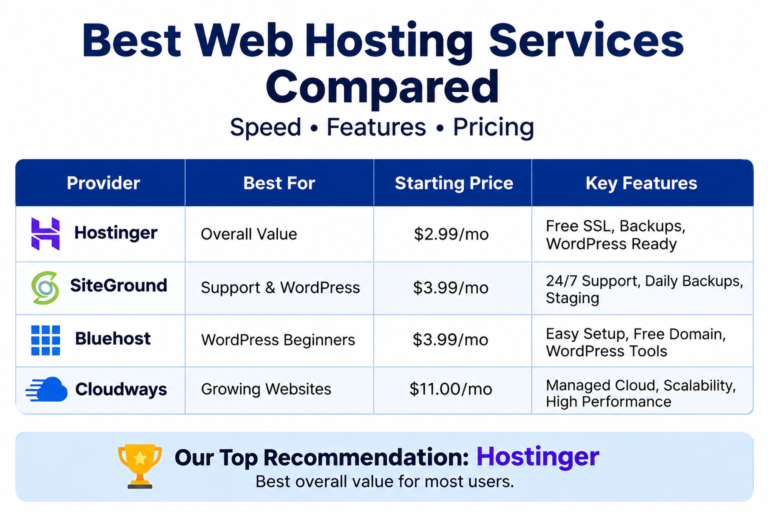
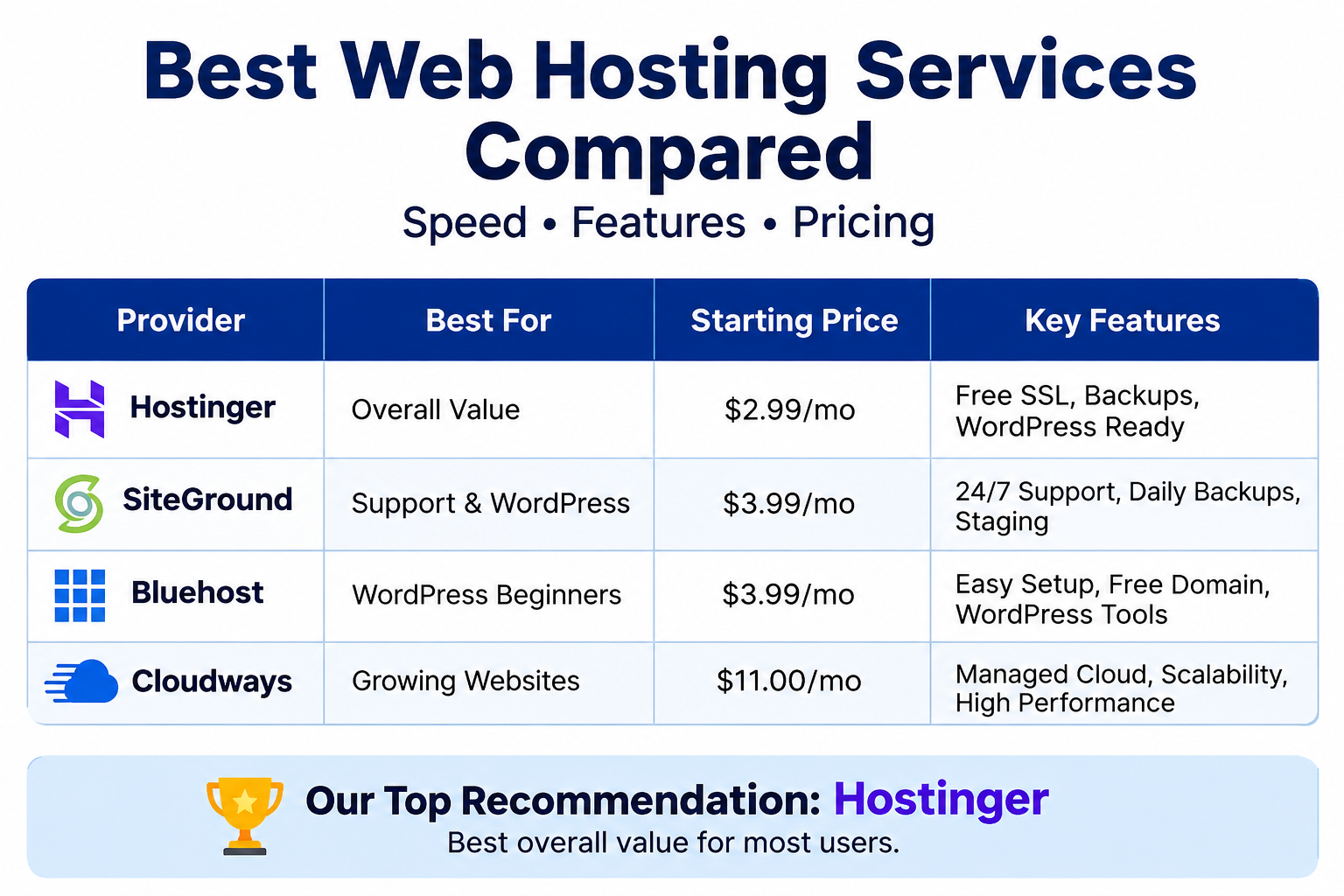
Best Web Hosting Services Compared
| Hosting Provider | Best For | Entry-Level Price* | Hosting Options | Backup | Free SSL | Beginner Friendly |
|---|---|---|---|---|---|---|
| Hostinger | Overall value | Around $2–$3/mo | Shared, VPS, cloud, WordPress | Yes | Yes | ⭐⭐⭐⭐⭐ |
| SiteGround | Support & WordPress | Around $3/mo promo | Shared, cloud, WordPress | Yes | Yes | ⭐⭐⭐⭐⭐ |
| Bluehost | WordPress beginners | Around $3/mo promo | Shared, VPS, cloud, WordPress | Plan-dependent | Yes | ⭐⭐⭐⭐⭐ |
| DreamHost | WordPress & value | Around $3/mo | Shared, VPS, dedicated, cloud | Yes | Yes | ⭐⭐⭐⭐⭐ |
| Cloudways | Managed cloud | Around $11/mo | Managed cloud | Yes | Yes | ⭐⭐⭐⭐ |
| ScalaHosting | Managed VPS | Around $3/mo promo | Shared, VPS, cloud | Yes | Yes | ⭐⭐⭐⭐ |
| IONOS | Low-cost entry | Around $1/mo promo | Shared, VPS, cloud, dedicated | Yes | Yes | ⭐⭐⭐⭐ |
| Namecheap | Budget websites | Around $2/mo | Shared, VPS, dedicated | Yes | Yes | ⭐⭐⭐⭐⭐ |
| GreenGeeks | Eco-conscious hosting | Around $3/mo | Shared, VPS, WordPress | Yes | Yes | ⭐⭐⭐⭐⭐ |
| InMotion Hosting | Performance & business | Around $5/mo | Shared, VPS, dedicated | Yes | Yes | ⭐⭐⭐⭐ |
*Promotional prices vary by region, billing term, taxes and current offers. Some hosts increase prices considerably at renewal. (CBOOMARANK)
What Is Web Hosting?
Web hosting is the service that stores your website’s files on an internet-connected server and makes them accessible to visitors.
When someone enters your domain name, their browser connects to the server where your website is hosted. The server sends back the necessary HTML, CSS, JavaScript, images, videos and other files.
In simple terms:
Domain name = your website’s address
Web hosting = the server where your website lives
Website = the content and software stored on that server
You need both a domain and hosting to operate a traditional website, although some website builders bundle the two together.
Why Web Hosting Matters
Your hosting provider can influence:
- Page loading speed
- Website uptime
- Server response time
- Security
- Backup availability
- Traffic handling
- Database performance
- WordPress performance
- Customer support
- Storage capacity
- Scalability
- Operating costs
Two websites using the same WordPress theme can perform very differently if one is hosted on a poorly configured server and the other uses optimized infrastructure.
That is why choosing hosting solely based on the cheapest monthly price is usually a mistake.
Types of Web Hosting Explained
Before comparing providers, it is important to understand the major types of hosting.
1. Shared Hosting
Shared hosting is the cheapest and simplest type of traditional web hosting.
Multiple websites use resources from the same physical server.
Advantages
- Affordable
- Easy to use
- Usually includes a control panel
- Good for beginners
- Often includes free SSL
- Usually supports WordPress
- Little technical knowledge required
Disadvantages
- Resources are shared
- Performance can be affected by other websites
- Limited server customization
- Less control than VPS or dedicated hosting
- Can struggle with sudden traffic spikes
Best for
Shared hosting is ideal for:
- Personal blogs
- Small business websites
- Portfolio websites
- Informational websites
- New websites
- Low-to-moderate traffic WordPress sites
For many first-time website owners, shared hosting is all they need.
2. VPS Hosting
VPS stands for Virtual Private Server.
A physical server is divided into virtual environments, giving each customer dedicated portions of CPU, RAM and storage.
VPS hosting offers more control and predictable resources than ordinary shared hosting.
Advantages
- Dedicated resource allocation
- Better performance
- Greater configuration control
- Root access on many plans
- Better scalability
- Suitable for larger websites
Disadvantages
- More expensive
- More technical knowledge may be required
- Poorly managed VPS servers can be difficult for beginners
- Security configuration may become your responsibility
Managed VPS hosting solves some of these problems by having the hosting company handle much of the server administration.
3. Cloud Hosting
Cloud hosting distributes infrastructure across interconnected servers or virtualized resources rather than relying on a single traditional server environment.
One of the biggest advantages is scalability.
If your website suddenly grows, cloud infrastructure can often provide additional resources more easily than basic shared hosting.
Cloud hosting is especially useful for:
- Growing businesses
- Ecommerce websites
- SaaS projects
- High-traffic websites
- Applications
- Websites expecting traffic spikes
Managed cloud platforms such as Cloudways make this infrastructure easier to operate without requiring every customer to become a Linux administrator.
4. Dedicated Hosting
With dedicated hosting, an entire physical server is allocated to one customer.
This provides maximum control and substantial resources.
Advantages
- Excellent performance potential
- Full server resources
- Greater customization
- High security control
- Suitable for demanding workloads
Disadvantages
- Expensive
- Requires technical expertise unless managed
- Often unnecessary for small websites
Dedicated hosting is usually appropriate for large businesses, high-traffic websites, complex applications and organizations with specialized requirements.
Hostinger Review
Best Overall for Most Beginners
Hostinger has become one of the most prominent budget-friendly hosting providers.
Its appeal comes from combining low introductory pricing with a relatively modern interface and a wide selection of hosting products.
Recent 2026 comparisons consistently place Hostinger among the leading overall hosting choices, particularly for beginners and small businesses. (TechRadar)
What Hostinger Does Well
- Beginner-friendly dashboard
- WordPress support
- Free SSL
- Free migration on eligible plans
- Multiple hosting categories
- NVMe storage on selected plans
- VPS options
- AI-assisted tools
- Competitive introductory pricing
Hostinger’s VPS offering has also become more interesting for technically capable users, with recent plans offering substantial increases in CPU, RAM and storage as you move up the tiers. (TechRadar)
Pros
- Excellent value
- Easy interface
- Strong selection of plans
- Good option for beginners
- VPS available for growth
- Free SSL
- Useful website-building tools
Cons
- Promotional pricing can be much lower than renewal pricing
- Cheapest plans have resource limitations
- Advanced users may want more control than shared hosting provides
Best for
Beginners, bloggers, small businesses and users looking for good overall value.
SiteGround Review
Best for Support and Managed WordPress
SiteGround is positioned more toward performance, support and managed website services than ultra-low pricing.
It is particularly popular among WordPress users and small businesses.
Independent comparisons frequently highlight SiteGround for strong support and WordPress-focused features. (HostPro Reviews)
Strengths
- Strong WordPress tools
- Good performance
- Automated backups
- Free SSL
- Staging features on eligible plans
- Managed services
- Strong customer support reputation
Pros
- Excellent support
- Good WordPress optimization
- Strong security tools
- Daily backups on qualifying plans
- Useful staging functionality
Cons
- Renewal pricing can be expensive
- Entry-level storage is relatively limited
- Not ideal for users focused solely on lowest cost
Best for
Small businesses, WordPress users and people who value support.
Bluehost Review
Best for WordPress Beginners
Bluehost remains one of the recognizable names in beginner WordPress hosting.
Its major advantage is simplicity.
Someone creating their first WordPress website may appreciate having domain registration, hosting, WordPress tools and website-building features integrated into one ecosystem.
Strengths
- Beginner-friendly setup
- WordPress-focused tools
- Free SSL
- Free domain on eligible plans
- Website migration options
- Simple control panel
Pros
- Easy to start
- Good WordPress integration
- Useful beginner tools
- Competitive promotional pricing
Cons
- Renewal prices can be significantly higher
- Performance varies between plans
- Some useful features depend on the plan
Best for
First-time WordPress website owners.
DreamHost Review
Best for Straightforward WordPress Hosting
DreamHost has a long history in the hosting industry and offers shared, VPS, dedicated and cloud hosting.
One feature that makes it particularly notable is its generous money-back guarantee on eligible shared hosting plans. Current comparisons list a 97-day guarantee. (Tom’s Guide)
Strengths
- WordPress-friendly
- Simple hosting
- Daily backups on selected plans
- Free SSL
- Cloud hosting available
- VPS and dedicated hosting options
Pros
- Beginner-friendly
- Good WordPress support
- Strong guarantee
- Broad hosting portfolio
Cons
- Performance can vary by plan
- Advanced users may prefer more server-level control
- Some competitors provide more performance-focused infrastructure
Best for
Bloggers, WordPress users and people who want straightforward hosting.
Cloudways Review
Best Managed Cloud Hosting
Cloudways is different from traditional shared hosting companies.
Instead of simply purchasing a conventional shared server plan, users can deploy managed cloud servers through infrastructure providers such as DigitalOcean and other cloud platforms.
This makes Cloudways particularly interesting for growing websites.
Strengths
- Managed cloud infrastructure
- Scalability
- Advanced caching
- Multiple cloud infrastructure choices
- Suitable for WordPress
- More resources than ordinary shared hosting
Pros
- Excellent scalability
- Good performance potential
- Managed server environment
- Suitable for growing websites
- Flexible infrastructure
Cons
- More expensive than basic shared hosting
- Can be confusing for complete beginners
- Pricing depends on infrastructure and resources
Current comparisons generally place Cloudways around the $11/month starting range, although the final price depends on the cloud server configuration selected. (CBOOMARANK)
Best for
Growing WordPress websites, developers, agencies and businesses.
ScalaHosting Review
Best for Managed VPS
ScalaHosting is worth considering when shared hosting is no longer enough but you don’t want to manage a VPS completely by yourself.
Its managed VPS products are designed to combine dedicated virtual resources with managed server administration.
Pros
- Managed VPS
- Strong resource allocation
- Good scalability
- Useful security tools
- Suitable for businesses
Cons
- More expensive than basic shared hosting
- More complexity than beginner hosting
- Not necessary for small websites
Recent managed-VPS comparisons have highlighted ScalaHosting as a strong option for users who want VPS resources with substantial management support. (TechRadar)
Best for
Growing businesses, ecommerce websites and users upgrading from shared hosting.
IONOS Review
Best Budget Entry Option
IONOS is known for aggressive introductory offers.
That makes it attractive if initial cost is your biggest concern.
However, you should always examine the standard renewal price and the exact features included with the plan.
Pros
- Very low promotional prices
- Broad hosting selection
- VPS and dedicated servers
- Cloud products
- Business-oriented infrastructure
Cons
- Promotional pricing can be misleading if you don’t check renewal terms
- Interface may not be as beginner-friendly as some competitors
- Support experience can vary
Best for
Budget-conscious users who carefully compare renewal pricing.
Namecheap Review
Best for Low-Cost Websites
Namecheap is widely known for domains but also provides web hosting.
It is attractive for users who want a relatively inexpensive way to host smaller websites.
Pros
- Affordable
- Beginner-friendly
- Domain and hosting ecosystem
- Free SSL
- Suitable for small sites
Cons
- Not the strongest option for high-performance applications
- Limited compared with premium managed hosting
- Advanced users may need more resources
Best for
Small websites, personal projects and budget-conscious users.
GreenGeeks Review
Best Eco-Conscious Hosting Option
GreenGeeks differentiates itself through its environmental positioning.
It combines standard hosting services with renewable-energy-related sustainability initiatives.
Pros
- Environmentally focused
- Free SSL
- Backups
- WordPress support
- VPS available
- Beginner-friendly
Cons
- Not always the cheapest
- Performance depends on plan and location
- Advanced users may prefer specialized cloud infrastructure
Best for
Bloggers and businesses that want hosting with a stronger sustainability focus.
InMotion Hosting Review
Best for Performance-Oriented Business Websites
InMotion Hosting offers shared, VPS and dedicated hosting.
It is particularly interesting for users who want more resources and business-focused hosting options without immediately moving to enterprise infrastructure.
Pros
- Strong hardware options
- NVMe storage on selected plans
- VPS and dedicated hosting
- Business-oriented plans
- Free SSL
- Migration support
Cons
- More expensive than entry-level hosts
- Not as simple as some beginner-focused providers
Best for
Business websites and users who prioritize performance and expansion.
Speed: Which Hosting Is Fastest?
Speed is one of the most important factors when selecting hosting.
However, there is no single “fastest hosting provider” for every website.
Website speed depends on:
- Server location
- CPU performance
- RAM
- Storage technology
- Web server software
- PHP version
- Database performance
- CDN
- Caching
- Website code
- WordPress plugins
- Image sizes
- Traffic volume
A lightweight WordPress site on an optimized shared server can sometimes outperform a poorly configured website on an expensive VPS.
Independent 2026 tests have reported strong response times from hosts such as SiteGround and Hostinger, although results vary significantly depending on methodology, location and configuration. (HostPro Reviews)
How to Improve Hosting Speed
Regardless of your host, you can improve performance by using:
1. CDN
A content delivery network stores copies of static content closer to visitors.
2. Caching
Caching prevents the server from rebuilding the same page repeatedly.
3. WebP or AVIF Images
Modern image formats can significantly reduce image file sizes.
4. Lightweight Themes
Avoid bloated WordPress themes packed with unnecessary functionality.
5. Fewer Plugins
Every additional plugin can introduce code, database queries or compatibility issues.
6. Updated PHP
Using a supported modern PHP version can improve security and performance.
7. NVMe Storage
NVMe storage can provide faster storage performance than older disk technologies.
Uptime: How Reliable Is Your Hosting?
Uptime refers to how often your website remains accessible.
A provider advertising 99.9% uptime sounds extremely reliable, but even that allows some downtime.
Approximate maximum downtime per year:
| Uptime | Approx. Downtime/Year |
|---|---|
| 99% | 87.6 hours |
| 99.9% | 8.76 hours |
| 99.95% | 4.38 hours |
| 99.99% | 52.6 minutes |
| 99.999% | 5.3 minutes |
For a personal blog, occasional downtime may be annoying.
For an ecommerce store, booking platform or business application, downtime can directly cost money.
That’s why businesses should pay more attention to infrastructure redundancy, monitoring, backups and support rather than simply choosing the host with the highest marketing uptime percentage.
Security Features to Look For
A good hosting provider should offer multiple layers of security.
Look for:
- Free SSL certificates
- Malware protection
- Firewall
- DDoS protection
- Account isolation
- Automated updates
- Secure backups
- Two-factor authentication
- Server monitoring
- Login protection
- Security scanning
SSL is particularly important because HTTPS protects data exchanged between visitors and your website.
Most major hosting companies now provide free SSL certificates on standard plans. (Hostinger)
Backups: One of the Most Important Features
Never choose hosting without checking its backup policy.
Ask:
- Are backups automatic?
- How frequently are they created?
- How long are they retained?
- Are backups stored separately?
- Can I restore individual files?
- Can I restore the entire website?
- Does restoration cost extra?
Daily backups are generally preferable for websites that change frequently.
For an ecommerce website, you should consider additional independent backups because your hosting company’s backup system should not be your only disaster-recovery strategy.
Customer Support Comparison
When your website goes offline at 2 AM, support becomes much more important.
Hostinger
Strong beginner-focused support and documentation.
SiteGround
One of its major selling points is customer support.
Bluehost
Good for beginners who need help with WordPress setup.
DreamHost
Strong documentation and support ecosystem.
Cloudways
More specialized support for managed cloud infrastructure.
VPS Providers
Support quality varies considerably depending on whether the server is managed or unmanaged.
If you’re not technically experienced, managed hosting can be worth paying more for.
Pricing: Don’t Focus Only on the Introductory Price
This is one of the biggest mistakes people make when buying hosting.
A provider may advertise:
$2.99/month
But that price might require a three-year subscription.
After the promotional period, the price may increase substantially.
For example, current 2026 comparisons show SiteGround and several other providers with significant differences between promotional and renewal pricing. (CBOOMARANK)
Always calculate:
Total first-term cost + renewal cost + domain cost + backup cost + premium plugin cost
before deciding.
Web Hosting for Indian Users
If your primary audience is in India, server location matters.
A hosting provider with infrastructure close to your audience can potentially reduce network latency.
Recent India-focused hosting comparisons show that providers with Mumbai or other Indian-region infrastructure can deliver very low latency for Indian visitors. (Mohit Koli)
For an Indian blog or business website, consider:
- Mumbai/India server availability
- CDN coverage
- INR pricing
- GST
- UPI or Indian payment options
- Indian customer support
- Data-center location
- Renewal price in INR
However, don’t automatically assume that an Indian server is always best.
If 80% of your audience is in the United States, a U.S.-based or globally distributed infrastructure may make more sense.
Which Hosting Type Should You Choose?
| Website Type | Recommended Hosting |
|---|---|
| Personal blog | Shared |
| New WordPress site | Shared / managed WordPress |
| Portfolio | Shared |
| Small business | Shared / cloud |
| Growing blog | Cloud / VPS |
| Ecommerce | VPS / cloud |
| High-traffic WordPress | Managed cloud |
| SaaS application | VPS / cloud |
| Large enterprise website | Dedicated / cloud |
| Development project | VPS / cloud |
Best Hosting for Beginners
If this is your first website, don’t overcomplicate the decision.
You probably don’t need:
- A dedicated server
- 32 GB RAM
- Root access
- Complex cloud architecture
- Advanced server management
Start with reliable shared hosting.
Recommended beginner choices
1. Hostinger — Best overall value
2. Bluehost — Easy WordPress setup
3. SiteGround — Best support-focused option
4. DreamHost — Straightforward WordPress hosting
Your goal should be to get the website online without spending money on resources you don’t need.
Best Hosting for WordPress
WordPress itself doesn’t require expensive hosting.
For a new blog:
Shared hosting → enough
For a growing website:
Better shared plan → VPS/cloud
For a large business:
Managed WordPress/cloud → better choice
SiteGround, Bluehost, Hostinger and DreamHost all offer WordPress-oriented solutions, while Cloudways targets users who want more scalable managed cloud infrastructure. (Hostinger)
Best Hosting for Ecommerce
Ecommerce websites need more than simple hosting.
You should prioritize:
- Reliability
- Backups
- Security
- SSL
- Database performance
- Scalable resources
- CDN
- Monitoring
- Support
For a small WooCommerce store, good shared hosting may be enough initially.
For a growing store, consider managed VPS or cloud hosting.
For a large store, dedicated or highly scalable cloud infrastructure may be appropriate.
Best Hosting for High-Traffic Websites
When traffic grows, shared hosting eventually becomes a bottleneck.
Consider moving to:
VPS → Managed Cloud → Dedicated/Enterprise Cloud
depending on your requirements.
Cloud hosting is particularly attractive because resources can often be scaled as traffic increases.
What Is the Best Web Hosting Service Overall?
For most users in 2026, Hostinger is one of the best overall choices because it balances price, ease of use, features and upgrade options.
But “best” depends on your priorities.
Choose Hostinger if:
You want excellent overall value.
Choose SiteGround if:
Support and managed WordPress tools matter more than the lowest price.
Choose Bluehost if:
You’re a beginner building a WordPress website.
Choose DreamHost if:
You want straightforward WordPress hosting and a generous guarantee.
Choose Cloudways if:
You need managed cloud infrastructure.
Choose ScalaHosting if:
You want a managed VPS.
Choose Namecheap if:
Your primary goal is keeping costs low.
Choose GreenGeeks if:
Environmental sustainability is an important consideration.
Choose InMotion Hosting if:
You want performance-oriented business hosting.
Pros and Cons of Web Hosting Overall
Pros
- Makes websites publicly accessible
- Multiple price levels
- Easy WordPress installation
- Free SSL commonly included
- Backups available
- Cloud scalability
- VPS and dedicated upgrades
- Customer support
- Website migration services
Cons
- Promotional pricing can be misleading
- Renewal costs can be much higher
- Cheap shared plans have resource limits
- Some advanced features cost extra
- Server performance varies
- Unmanaged VPS hosting requires technical knowledge
How to Choose the Best Web Hosting
Use this checklist before purchasing.
1. Determine Your Website Type
Is it a blog, business website, store or application?
2. Estimate Traffic
A website receiving 1,000 visitors per month has very different requirements from one receiving 1 million.
3. Check Server Location
Choose infrastructure close to your primary audience when possible.
4. Compare Renewal Prices
Never compare only introductory pricing.
5. Check Backups
Understand exactly what is included.
6. Check Security
Look for SSL, firewalls, malware protection and account security.
7. Check Migration
Free migration can save time and money.
8. Check Support
24/7 support can be valuable when something goes wrong.
9. Look at Upgrade Options
Your hosting needs may grow.
10. Read the Resource Limits
“Unlimited” storage or bandwidth doesn’t necessarily mean unlimited CPU or RAM.
Common Web Hosting Mistakes
Choosing the Cheapest Host
Saving a few dollars isn’t worthwhile if your website becomes slow or unreliable.
Ignoring Renewal Prices
The promotional price isn’t necessarily what you’ll pay long term.
Buying Too Much Hosting
A new blog doesn’t need a dedicated server.
Ignoring Backups
A website without reliable backups is vulnerable to permanent data loss.
Choosing a Server Far From Your Audience
Distance can contribute to higher latency.
Installing Too Many Plugins
Poor website optimization can make even excellent hosting appear slow.
Frequently Asked Questions
What is the best web hosting for beginners?
Hostinger, Bluehost, SiteGround and DreamHost are among the easiest options for beginners. Hostinger is particularly attractive for users who want a balance between price and features.
Is cheap web hosting safe?
It can be. Price alone doesn’t determine security. Look for SSL, firewalls, backups, malware protection and account isolation.
Is shared hosting enough for WordPress?
Yes. Shared hosting is sufficient for many new and small WordPress websites.
When should I upgrade from shared hosting?
Consider upgrading when your site consistently uses its allocated resources, becomes slow during traffic spikes, experiences resource-limit warnings, or needs more control.
Is VPS hosting better than shared hosting?
Generally, VPS hosting provides more dedicated resources and control. But it is more expensive and can require greater technical knowledge.
Is cloud hosting better than VPS?
Not automatically. Cloud hosting generally provides more flexible infrastructure and scalability, while a VPS can offer predictable resources at a lower cost.
Do I need dedicated hosting?
Most websites don’t. Dedicated hosting makes sense for demanding websites with high traffic, specialized workloads or strict resource requirements.
Does hosting affect SEO?
Hosting can indirectly affect SEO through website speed, uptime, security and server performance. However, hosting is only one part of overall search performance.
How much does web hosting cost?
Entry-level promotional hosting can cost only a few dollars per month, while VPS, managed cloud and dedicated hosting can cost considerably more. Current 2026 comparisons show entry-level plans ranging roughly from $1 to several dollars per month, while managed cloud services commonly start around $10+ per month. (CBOOMARANK)
Can I change my hosting provider later?
Yes. Website migrations are common. Many providers offer migration assistance.
Should I buy hosting and domain from the same company?
You can, but you don’t have to. Keeping them with separate providers can give you more flexibility.
Final Verdict
The best web hosting service isn’t necessarily the cheapest or the one with the longest feature list.
The best choice is the provider that gives your website the right combination of speed, reliability, security, support, resources and scalability at a price you can comfortably maintain after renewal.
For most beginners, Hostinger is an excellent overall starting point.
For support-focused WordPress users, SiteGround is worth considering.
For first-time WordPress users, Bluehost remains a straightforward choice.
For users who want a simple WordPress experience, DreamHost is another strong option.
For websites that have outgrown shared hosting, Cloudways or a managed VPS such as ScalaHosting can provide a more powerful next step.
The most important lesson is simple: don’t buy hosting based only on the headline monthly price. Check renewal costs, resource limits, backups, server locations, security features and upgrade options before paying.
A good hosting provider should not only keep your website online today—it should give you a practical path to grow tomorrow.
Recommended Hosting Strategy
If you’re starting a new website:
Step 1: Start with quality shared hosting.
Step 2: Optimize WordPress, images and caching.
Step 3: Monitor traffic and resource usage.
Step 4: Upgrade to VPS or cloud hosting when necessary.
Step 5: Add CDN, automated backups and stronger security as your website grows.
This approach keeps costs under control while giving you room to scale.
Bottom line:
Best overall: Hostinger
Best for support: SiteGround
Best for WordPress beginners: Bluehost
Best straightforward WordPress option: DreamHost
Best managed cloud: Cloudways
Best managed VPS: ScalaHosting
Best budget-focused option: Namecheap / IONOS
Best eco-conscious option: GreenGeeks
Best performance-oriented business option: InMotion Hosting
Prices, features and promotions change, so verify the current plan details before purchasing. 2026 comparison sources likewise emphasize that introductory prices, renewal costs and included features can differ substantially between providers. (CBOOMARANK)
About the Author